Free, no sign-up
Markdown to PDF converter
To convert Markdown to PDF, paste your text or upload a .md file, pick a page style, and download a typeset PDF with tables, highlighted code and page numbers.
- Book, Report or Plain style
- US Letter or A4
- Images from a .zip
Convert a file
- Upload
- Convert
- Download
Uploading…
Your file is ready
Deleted from our server within 60 minutes.
How did it turn out?
What went wrong?
Thank you. Only your answer is kept, nothing from your file.
Free: 10 PDFs a day to Markdown (OCR on up to 45 scanned pages each, 100 a day; a pass reads up to 180) and 30 Markdown files a day to PDF. Only convert files you have the right to. Password-protected PDFs can't be converted.
Three page styles
The same short Markdown file, made into a PDF with each style. These are the first pages of real output, unedited.
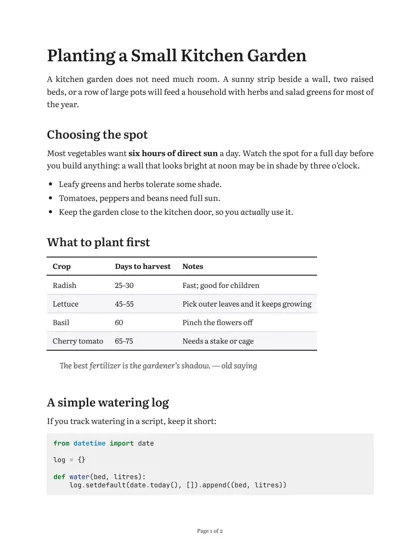
Book. Literata serif type, justified paragraphs with indents. For essays, stories and long reads. 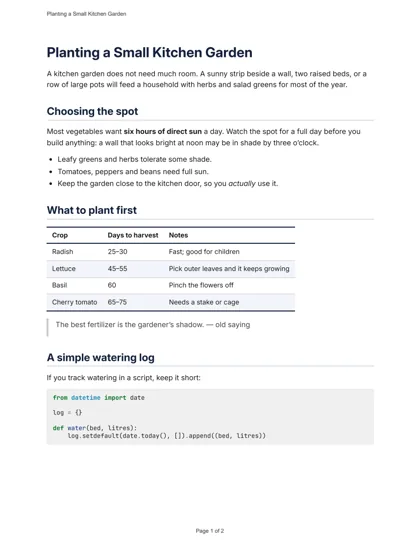
Report. Clean sans-serif with navy headings and the title at the top of each page. For work documents and handouts. 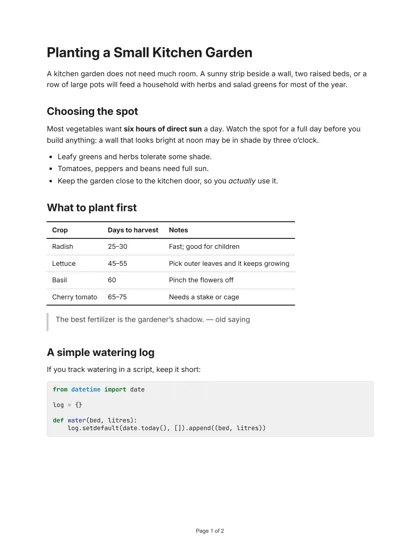
Plain. Black and white, no extras. For notes, drafts and anything you will print a lot of.
What comes through
Tables
Pipe tables get ruled lines and a bold header row, and a long table keeps its header on each new page.
Code blocks
Fenced code is set in JetBrains Mono with syntax colours for the language you name after the backticks.
A contents page
Long documents with several headings start with a contents page that links to each section.
Page numbers
Every page is numbered "Page 3 of 12" at the foot, so a printed copy stays in order.
Maths, footnotes and checklists
TeX between $ signs is set as real equations, footnotes collect at the end with links back, and - [x] task lists print as ticked boxes.
How to convert Markdown to PDF
Add your Markdown
Paste it into the box, or choose a .md file. If it has pictures, choose a .zip that holds the file and its images instead.
Pick the look
Choose a page style, the paper size, and whether you want a contents page.
Download the PDF
Press Make PDF. A short file is ready in a few seconds, and the download starts from the button.
Going the other way? The PDF to Markdown converter turns a PDF back into editable text, and how the PDF is typeset explains what happens to your file. To check how a file reads before you print it, open it in the Markdown viewer.
Markdown to PDF questions
Is the Markdown to PDF converter free?
Yes. You can make 30 PDFs a day without an account, from Markdown up to 1 MB, or a .zip up to 20 MB when it carries images.
How do I put images in the PDF?
Put your .md file and its pictures in one .zip, keeping the folders your Markdown links to, and upload the .zip. Pictures linked from a web address are not fetched; the PDF shows their alt text instead.
Which Markdown does it understand?
Standard Markdown (CommonMark) with the GitHub extras: tables, strikethrough, task lists, footnotes and fenced code with syntax colours. Definition lists work too, maths written in TeX between $ signs is typeset, and the YAML front matter at the top of a file is hidden. Raw HTML is printed as text rather than run.
Will my Obsidian or GitHub notes work?
Ordinary Markdown from either works. App-only extras such as Obsidian's [[wiki links]] or callout boxes appear as the plain text you typed.
Can I choose A4 paper?
Yes. Pick US Letter or A4 under Paper. Long documents also get a contents page, which you can switch on or off.
Is it safe to upload my notes?
Your Markdown is laid out by a browser engine with scripts switched off and no internet access, and it is deleted as soon as the PDF is made. The PDF is deleted within 60 minutes.
Ready to make your PDF?
Convert Markdown nowFree limits are on the pricing page.